
Would you like to protect your Yahoo emails? Emails nowadays sometimes contain memories, files, and vital information. Creating a backup of your emails is a smart idea if you use Yahoo Mail. This can help you prevent technological problems, inadvertent deletion, or data loss brought on by hacking.
This post will teach you how to manually backup Yahoo emails and how to employ an automated solution for expediency.
Why should you backup Yahoo Mail?
Backing up your Yahoo Mail provides mental comfort. This is the reason it matters:
- Guard your records against inadvertent deletion.
- Store a copy in case your account is hacked.
- Helps you clear the area in your mailbox.
- Allows you offline access to critical emails.
- Guarantees that you never lose priceless attachments.
Method 1: Manual Solution to Backup Yahoo Emails
Yahoo Mail lacks a built-in backup choice. But by using these guidelines, you can manually store your emails:
Step 1: Open your Yahoo Mail.
Using your email ID and password, log into your Yahoo Mail account.
Step 2: Choose the emails you wish to backup
Visit any folder or your inbox. Tick the little boxes next to every email you wish to keep.
Step 3: forward emails to another account.
Click the Forward button to forward the chosen emails to yet another email address. This makes a copy of your emails.
Step 4: Get Attachments Online
Should the email have attachments, open it and download the files to your device.
Step 5: optional PDF saving of emails
Create Save as PDF by opening an email, and clicking Print. This copies the email to your computer.
Limitations
Though free, the manual method has many shortcomings:
- Your selection of emails at one time is limited.
- Given thousands of emails, it takes a lot of time.
- One attachment at a time, downloads are required.
- Important emails can be missed during the selection.
- No means to support Yahoo contacts or calendars.
Use a professional tool if you seek a quicker and safer answer.
Method 2: Professional Solution to Backup Yahoo Mail
The GainTools Yahoo Backup Tool helps you to backup Yahoo emails more easily. This application automates the whole process, so it is quick and hassle-free instead of personally choosing and saving every email. It lets user’s backup emails including attachments in several formats, including PST, MBOX, EML, etc. This guarantees that emails might be accessed on Outlook, Thunderbird, and other email clients, among other platforms.
The utility also offers choices to choose particular folders, keep folder hierarchy, and preserve email attributes including date, sender, and subject. Even non-technical individuals can backup their emails in a few clicks thanks to a simple UI. For individuals who wish for a safe and quick method to store their Yahoo Mail data without devoting hours of labor, this is a terrific option.
Key Features
- Create a backup of a few chosen Yahoo folders.
- Save Yahoo backup PST, MSG, MBOX, EML, EMLX, HTML, etc.
- Save Yahoo attachments sent via emails.
- Maintain meta qualities and formatting integrity.
- Download Yahoo messages PST without Outlook.
- Yahoo Mail Backup Tool Windows OS
- Kind wizard for simple app operation
- One by one, backup multiple Yahoo accounts.
- Offers a free demo version.
- 24/7 tech assistance.
Steps to Follow
Step 1: Download the Yahoo Backup Tool.
Step 2: Enter the Yahoo Mail credentials. 
Step 3: Choose Inbox, Sent, Drafts, or any custom folder.

Step 4: Choose the file format you want to save your emails in. Options include PST, MBOX, EML, etc.

Step 5: Set the destination folder where you want to save the backup.
Step 6: Hit the Backup Now tab. 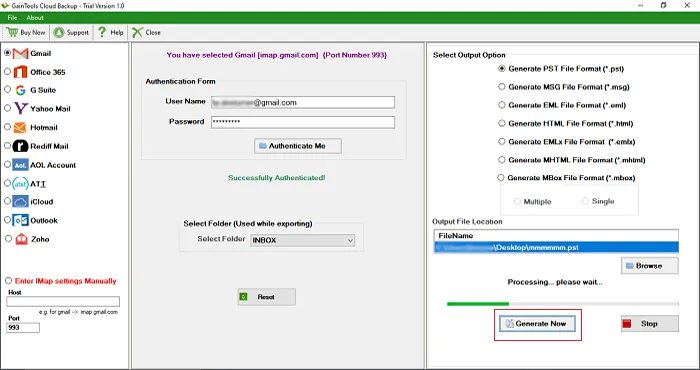
Commonly Asked Questions
Q. Is it possible to simultaneously back up my whole Yahoo Mail?
A. You are able, indeed. With the Yahoo Backup Tool, you can choose to backup your whole mailbox in one run.
Q. Is there a free method to back up Yahoo Mail?
A. Emails can be manually forwarded or stored as PDFs. This approach is sluggish, so it might not be suitable for big mailboxes.
Q. Will the backup consist of attachments?
A. Definitely yes. The Yahoo Backup Tool stores emails together with all related attachments.
Q. Can I save Yahoo emails to an external hard drive?
A. Absolutely. Using the backup program, you can designate an external hard disk as the destination folder
Last words
One wise approach to safeguarding your critical emails and files is backing up your Yahoo Mail. Having a backup ensures your data is safe from accidental deletion, hacking, or technical difficulties whether you decide on the manual approach or utilize the Yahoo Backup Tool.
Although the manual approach is free, it is not best for big mailboxes and is time-consuming. Conversely, the GainTools Yahoo Backup Tool provides a quicker and more effective method for the backup of your emails, including attachments, in several formats. It keeps data integrity, saves time, and offers a hassle-free backup.


