
Imagine you opened your Outlook to check the schedules like meetings, deadlines, and team calls. Suddenly, Outlook stops working and restricts you from accessing your calendar. So, how do you access/extract calendar from OST files?
With a growing hybrid work environment, everything runs on schedule. Outlook calendar plays a vital role in scheduling meetings, appointments, deadlines, etc., but losing it might break your workflow. There could be many reasons, such as outdated Outlook, synchronization issues with Exchange, OST file corruption, etc., for such problems.
However, you can’t waste hours to rebuild your scheduling, so you need high-end resolution to access/extract calendar from OST files. This expert guide will help you with easy-to-follow tips and methods to resolve this issue. Anyone can do it; follow the guide and get started!!!!
Why Extract Calendar from OST Files? Get Extra Benefit!!
Extracting calendars from OST files fulfils many necessities like accessibility, backup or migration. Below is a detailed explanation of the benefits:
- Easy Migration
If you switch to another email client (Thunderbird or web-based), you can easily export your calendar data without workflow disruption.
- Data Backup and Recovery
Extracting the calendar from the OST file creates a separate backup and an extra layer of security. It prevents your scheduling from hazardous situations like system crashes, file corruption, server downtime, etc. With backup, you can recover your calendar data anytime.
- Easy Import and Full Control
The extracted calendars can be easily imported into Outlook to easily switch between devices and email accounts. Moreover, this gives you complete control over your calendar data, allowing you to organize your schedule and events efficiently.
- Easy Share and Accessibility and Sharing
Extracting Calendar from OST files makes it easier to share and give access to the user who doesn’t have an Outlook email client.
How to Extract Calendars from Outlook OST Files?
Here is a complete set of effective methods to easily extract calendar from OST files. Go through each and pick them at your convenience:
Method 1: Extract Calendar from OST Files using Microsoft Outlook
Outlook also provides an Import/Export feature that allows you to extract calendar from OST files. These methods only work when your OST file connects to the original Outlook profile. Here are the steps to follow:
- Open the Outlook application and go to the File menu. Tap on Open & Export, then Import/Export.

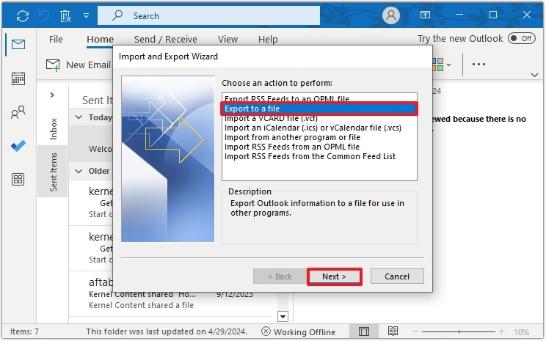
- Choose Export to a file. Click Next.
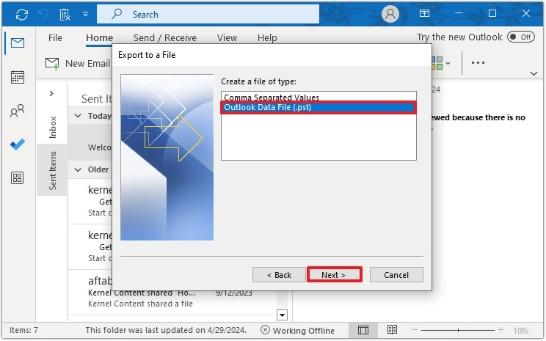
- Select Outlook Data File (.pst). Click Next.
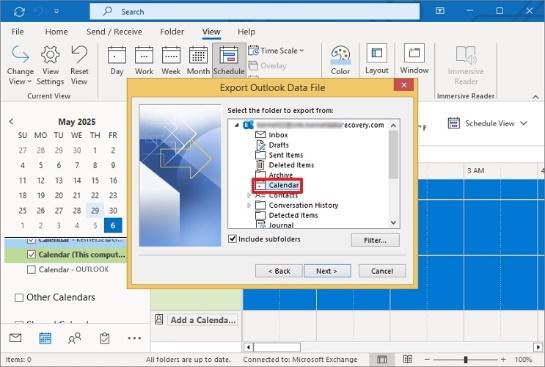
- Choose Calendar from the folder list.
- Specify the saving location to save the exported PST file and click Finish.
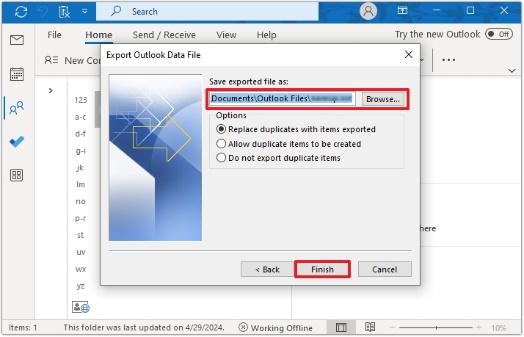
Your Outlook calendar data is exported into a PST file.
Method 2. Drag and Drop Calendar Items to PST File
You can also add your specific or entire calendar items to PST files by using the drag-and-drop technique. Here is the complete stepwise procedure:
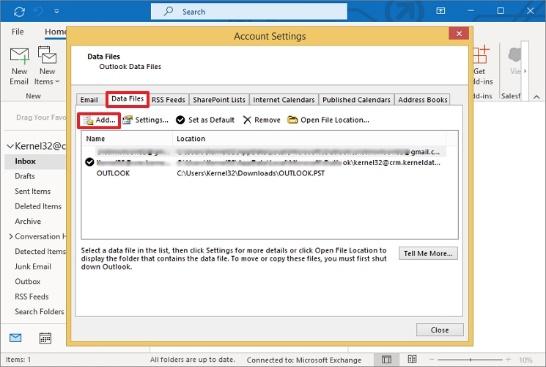
- Open Outlook and go to the File menu. Choose Account Settings, tap Data File, and click Add to create a new PST file.
- Now, go to your Calendar view.
- Select the required calendar items and drag and drop them into the new PST file calendar section.
Your OST calendar is now extracted into a PST file.
These methods are sufficient to export calendar from OST file if the OST file is connected to the Outlook profile. But what if your OST file is corrupted, becomes orphaned, or you need to recover an old OST file calendar item? It looks very complex and annoying.
In such cases, you can’t directly extract calendar from OST files due to the unavailability of manual procedures. So, you need a reliable third-party OST to PST converter tool that easily recovers OST calendars from damaged, corrupted, or orphaned OST files in minutes.
The Kernel OST to PST Converter is a professional and effective tool that many professional and business users usually recommend. It has many features and capabilities, like preview, bulk conversion, special filters, etc., to meet all your requirements for OST calendar recovery.
With this tool, you can recover all your OST data, including emails, attachments, tasks, etc., and permanently delete items in PST, MSG, MBOX, or many other files. Moreover, the tool directly migrates the OST calendar to multiple servers and cloud platforms.
Summing Up
We hope you’ve understood the step-by-step methods to extract calendars from the OST file. You can use Import/Export or drag and drop techniques for calendar recovery.
We recommend you use a third-party automated OST to PST converter to get your calendar back, no matter your situation, whether your Outlook works or you’ve damaged OST. Also, this tool recovers all deleted items with ease. Download the trial version now to test its functionalities and effectiveness!!!!


