

Businesses of all sizes encounter distinct challenges that can hinder productivity and impede their ability to compete effectively. To navigate these issues, they require straightforward remote access solutions that enable employees to work from any location and address complex problems with ease.
AnyViewer is a tailored remote access software for businesses. It offers simple remote support and unattended access, making it user-friendly and efficient. This affordable tool helps teams quickly resolve issues, minimizing downtime.
As remote work becomes the norm, AnyViewer equips organizations to stay competitive. By providing employees with the right tools, businesses can enhance flexibility and drive growth in today’s fast-paced market.
Why AnyViewer is the best choice for business?
When it comes to choosing the best remote access software for businesses, several factors can influence your decision. Let’s explore why AnyViewer stands out as the ideal choice.
- Tailor-Made Solutions
Every business faces its own unique challenges. AnyViewer takes the time to understand your specific needs and provide customized solutions that fit perfectly.
- Simple to Use
For growing SMBs, time is crucial. AnyViewer recognizes that you can’t afford to waste time on complicated setups. AnyViewer remote access software offers an intuitive and user-friendly interface for seamless remote support.
- Robust Security
Security is a top priority at AnyViewer. We require device authentication for all sign-ins and offer optional two-factor authentication for added protection. Our software also utilizes ECC 256-bit end-to-end encryption to ensure secure sessions.
- Cost-Efficient
Staying within budget is essential for businesses. As a bootstrapped company ourselves, AnyViewer delivers a feature-rich remote access and support solution at an affordable price. With our software, you can monitor your company’s growth while enhancing efficiency.
What are the features that AnyViewer offers?
As a leading choice in remote access solutions, AnyViewer boasts a variety of advanced features designed to improve business operations:
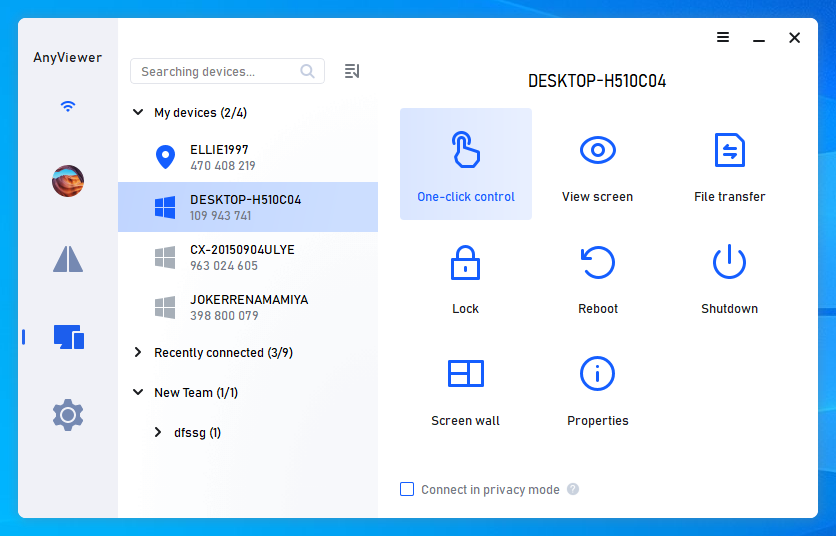
- Unattended & Attended Remote Access: Use “One-click control” for seamless, unsupervised access from anywhere. Alternatively, set up a security code for guided access when remote IT support services are required.
- Fast File Transfer: Transfer files quickly and securely, utilizing advanced encryption to safeguard your data against theft and interception.
- Unlimited Concurrent Sessions: Manage multiple sessions simultaneously, enabling efficient handling of various teams or clients.
- Screen Walls: Monitor and control multiple screens within a single window, making it ideal for remote training and support.
- Mass Deployment (MSI): Simplify installation across your organization with MSI packages, facilitating straightforward updates and deployments.
- User Permission Management: Regulate access rights for individuals and groups to enhance data security and streamline team management.
- Access in Privacy Mode: Allow employees to work from home discreetly with Privacy Mode. This feature blacks out the remote device’s screen and disables its physical keyboard, preventing interruptions or unauthorized monitoring during remote sessions.
How to use AnyViewer for business remote access
AnyViewer features an intuitive user interface that streamlines both setup and usage. To make remote business access easier, follow these steps:
Step 1: Download and Install
Begin by downloading AnyViewer for free. Install the application on both PCs and launch it once the installation is complete.
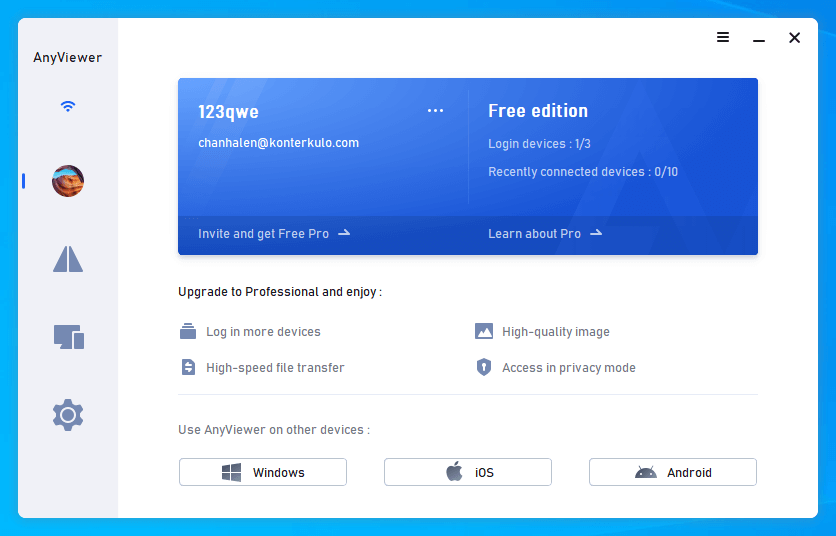
Step 2: Register or Log In
If you’re a new user, register in the app’s login section. Current users can easily log in by entering their credentials.


Step 3: Upgrade
After logging in, click on “Learn about Pro” to explore options for upgrading to a Professional or Enterprise plan, if necessary.
Step 4: Connect Devices
Utilize the One-click control feature for quick and direct connections between all your devices.
The bottom line
In conclusion, AnyViewer emerges as the best remote desktop software for businesses, addressing unique challenges with tailored, user-friendly solutions. Its robust security features, cost-efficiency, and advanced functionalities make it ideal for fostering productivity in a remote work environment.
By equipping teams with effective tools, AnyViewer not only enhances flexibility but also drives growth, ensuring that businesses remain competitive in today’s fast-paced market. As remote work continues to evolve, AnyViewer stands ready to support organizations in achieving their operational goals.